openapi: 3.0.0
info:
title: Atomberg Home Public APIs
description: |
Welcome to the Developer Console of the Atomberg Home Smart Platform (referred to as Phoenix).
This webpage documents the APIs that let you control your Atomberg smart fans and
water purifiers programmatically, and read the state of your smart locks.
Now the Phoenix platform is your playground!
*Want to set a custom sleep mode routine for your fan? Go for it.*
*Want to switch your purifier to Vacay mode while you are away? You can do that too.*
*Want to trigger your fan based on inputs from other appliances or sensors? It's possible now.*
*Want to get your hands dirty with a smart home automation system? We are glad to provide you the first experience.*
We can't wait to see all the interesting ideas that you come up with. In order to access these APIs, you need
1. One or more Atomberg smart devices connected to the Atomberg Home app. Check out our range of smart fans [here](https://atomberg.com/landing/smartfans).
2. API Key
3. Refresh token: This is used to generate the access token that is further
used for authenticating other API calls
Both the API Key and Refresh token can be generated by enabling the developer options in the
Atomberg Home app. Please note that you only get access to control Wi-Fi
enabled smart devices added to the account used for generating the above
credentials in the Atomberg Home app. The quota limitations for each API Key
is as follows:
1. Daily: 100 API calls/day
2. Throttle: 5 API calls/second
# Supported devices
| Device | Model | Series | Send Command | Get Device State | Get Device Analytics |
| --- | --- | --- | --- | --- | --- |
| Smart fans | Renesa / Renesa+ / Studio+ | R1, R2, R3, R4, R6 | Yes | Yes | Yes |
| | Renesa Fusion | R5 | Yes | Yes | Yes |
| | Renesa Elite / Studio Nexus | S1, S2, S3 | Yes | Yes | Yes |
| | Aris | I2 | Yes | Yes | Yes |
| | Aris Gladius | I3, I4 | Yes | Yes | Yes |
| | Aris Contour | M1, M2, M3 | Yes | Yes | Yes |
| | Aris Starlight | I1, I5 | Yes | Yes | Yes |
| | Erica | K1 | Yes | Yes | Yes |
| | Emperion Magna | O1 | Yes | Yes | Yes |
| Water purifiers | Intellon | W2 | Yes | Yes | Yes |
| Smart locks | Cypheo Elite | G1 | No | Yes | - |
| | Azhero Smart Door Lock / SL1 | smart_lock_black | No | Yes | - |
A series not listed above gets a `501` error. The message names the series
and lists the supported ones.
## What a device accepts
You do not need to copy the table above into your code. Each device in 'Get
List of Devices' has a `device_type` and a `supported_commands` list. The
list shows the commands the device accepts and the values for each one. If
your code reads this list, new devices will work without any changes.
# Home Assistant Integration
For users looking to use the public API for Home Assistant, please check out [this integration](https://github.com/dasshubham762/atomberg-integration) by one of our users.
# Quickstart
## Step 1
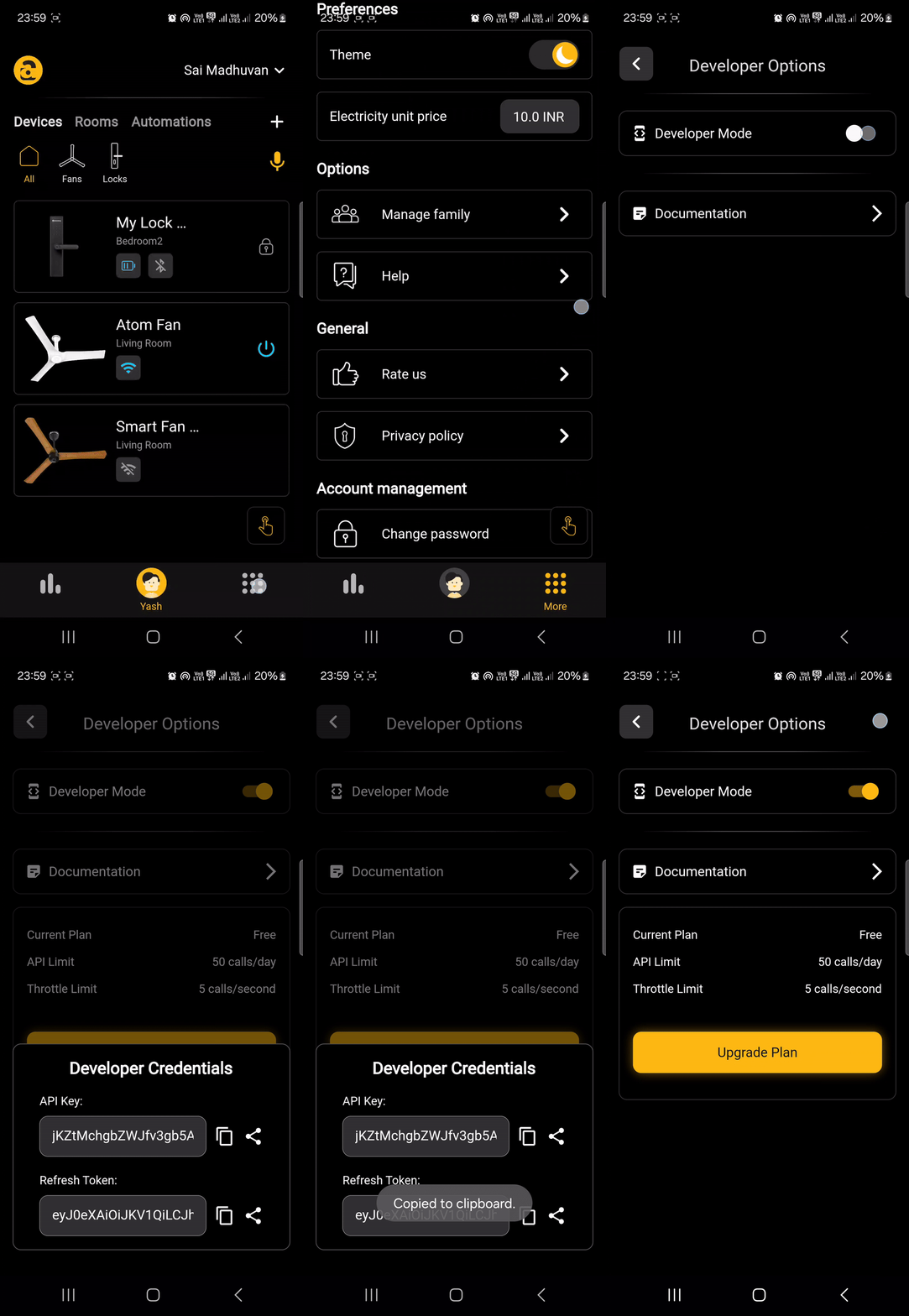
Enable Developer Mode in the Atomberg Home app. This gives you the API key
and refresh token that the APIs need. Store them securely. Send the API key
in the x-api-key header of every API call. Use the refresh token only in the
Authorization header of the 'Get Access Token' API.
 ## Step 2
Use the refresh token in the Authorization header of the 'Get Access Token'
API to get an access token for the other APIs. This token expires after 24
hours.
## Step 3
Use the access token in the Authorization header of the 'Get List of
Devices' API. It returns all the devices in your account and the commands
each one supports. Note down the device_id of the devices you want to use.
A device you add to your account works immediately. You do not need a new
access token after adding or removing a device.
## Step 4
Use the device_id to read the state of a device (using the 'Get Device
State' API), read its usage (using the 'Get Device Analytics' API), or send
it a command (using the 'Send Command' API).
# The response envelope
Every response has the same format, whether it succeeds or fails.
```json
{ "status": "Success", "message": { "device_state": [ ] } }
```
```json
{ "status": "Error", "message": "speed must be an integer between 1 and 6" }
```
On success, `message` contains the response data. On error, `message`
contains the description of the error. Do not parse the message. Use the HTTP
status code in your code, because the message text can change.
# Authentication
The API uses two tokens. Each one lasts for a different time and is used in
different places.
| Token | Where it comes from | Lifetime | Used on |
| --- | --- | --- | --- |
| Refresh token | Developer Mode in the Atomberg Home app | Does not expire | 'Get Access Token' only |
| Access token | 'Get Access Token' | 24 hours | Every other endpoint |
The API key goes in `x-api-key` on **every** call including 'Get Access
Token'. The token goes in `Authorization: Bearer `.
Get one access token a day and reuse it. Each new access token uses one call
from your quota, so getting a new token before every request can use up your
whole daily quota.
Disabling Developer Mode in the app cancels the refresh token and every
access token made from it. Do this right away if your credentials leak.
Every call checks which devices are on your account at that moment. A device
you add in the app works right away. You do not need a new access token after
adding or removing a device.
# Quota and rate limits
| Plan | Per day | Per second |
| --- | --- | --- |
| Free (default) | 100 | 5 |
Keep these two points in mind:
**Failed calls count.** The quota is counted before your request is checked,
so a `400` uses quota just like a `200`. Retrying a bad request in a loop will
use up your daily quota.
**`device_id=all` is one call.** 'Get Device State' and 'Get Device
Analytics' accept `device_id=all` and return every supported device in one
call. Reading six devices one by one costs six calls. Reading them with `all`
costs one. Devices that this API does not support are left out.
For fans, you can read the state without using any quota. See the UDP section
under 'Get Device State'. A fan sends its state on the local network after
every change, so a program on the same network can track it without calling
the API.
# Status codes
| Code | Meaning | What to do |
| --- | --- | --- |
| 200 | Accepted | For a command, check 'Get Device State' to confirm the change. |
| 400 | The request is not valid, or the command is not supported by that device | Fix the request using `message`. Sending it again unchanged will fail again. |
| 401 | The API key or access token is missing, wrong, malformed or expired | Get a new access token. If that does not help, check the API key. |
| 403 | Developer Mode is not enabled on the account, or the URL path or HTTP method is wrong | Enable Developer Mode in the Atomberg Home app. Check the URL and the method. |
| 404 | The device is not on your account, or has not reported any state yet | Call 'Get List of Devices' again. A new device reports nothing until it is switched on for the first time. |
| 429 | Daily quota used up, or per-second limit exceeded | Wait before trying again. The daily quota resets at 00:00 UTC. To make fewer calls, use `device_id=all`, or UDP for fans. |
| 500 | Something went wrong on our side | Try again after a short wait. Contact us if it keeps happening. |
| 501 | The device's series is not supported yet | The message lists every supported series. |
| 502 | Our platform could not deliver the command or create the PIN | Try again after a short wait. |
| 503 | The device is offline, so the command could not be delivered | Try again when the device is back online. 'Get Device State' shows `is_online`. |
| 504 | The request took longer than 29 seconds | Try again. For a command, check 'Get Device State' first. The command may already have worked. |
Only retry `429`, `500`, `502`, `503` and `504` automatically. Other `4xx`
errors will keep failing until you change the request.
Errors come back as `{ "status": "Error", "message": "..." }`. A few come from
AWS before the request reaches the API. They have only `message`. These are
the `401` for a missing or unknown API key, the `403` for a wrong path or
method, the `429` for the per-second limit, and the `504`.
---
* For any queries, please contact app@atomberg.com
* Please ensure that your developer credentials are stored securely
* If you suspect that your developer credentials have been leaked, please disable the Developer Mode immediately from the Atomberg Home app
version: 2.0.0
servers:
- url: https://api.developer.atomberg-iot.com/v2
description: Production
- url: https://6yrk5x4p32.execute-api.ap-south-1.amazonaws.com/dev
description: Development
components:
securitySchemes:
apikeyAuth:
type: apiKey
in: header
name: x-api-key
description: >-
Your developer API key, generated by enabling Developer Mode in the
Atomberg Home app. Required on every request.
bearerAuth:
type: http
scheme: bearer
bearerFormat: JWT
description: >-
The 24-hour access token from 'Get Access Token'. Enter it once here and
it is used for every request below.
'Get Access Token' does not use this field. For that request, put the
refresh token in its own Authorization field.
responses:
BadRequest:
description: >-
The request is not valid, or the command is not supported by that
device. The message names the wrong key and lists what the device
accepts.
content:
application/json:
schema:
$ref: '#/components/schemas/Error'
examples:
unsupportedCommand:
summary: Command not valid for this series
value:
status: Error
message: >-
Command 'brightness' is not supported by series R1. Supported
commands: power, speed, speedDelta, sleep, timer, led
valueOutOfRange:
summary: Value out of range
value:
status: Error
message: Command 'speed' expects an integer from 1 to 6
purifierOneKey:
summary: More than one purifier command in a message
value:
status: Error
message: >-
Water purifiers accept one command key per message, received
2: mode, idle_sleep
lockCommand:
summary: Commands sent to a lock
value:
status: Error
message: Series G1 (lock) does not accept commands on this endpoint
missingDeviceId:
summary: No device_id
value:
status: Error
message: device_id is required. Pass a device_id, or all
Unauthorized:
description: >-
The API key or token is missing, malformed or expired, or it is the
wrong kind of token.
content:
application/json:
schema:
$ref: '#/components/schemas/Error'
examples:
expired:
summary: Expired access token
value:
status: Error
message: 'Authorization error JwtParseError: Jwt is expired'
malformed:
summary: Malformed token
value:
status: Error
message: 'Authorization error: malformed token'
apiKey:
summary: API key missing or unknown
value:
message: Unauthorized
Forbidden:
description: >-
Developer Mode is not enabled for this account, or the user does not
exist. You also get a 403 when the URL path or HTTP method is wrong.
content:
application/json:
schema:
$ref: '#/components/schemas/Error'
examples:
devModeOff:
summary: Developer Mode disabled
value:
status: Error
message: Developer mode not enabled for this user
wrongPath:
summary: Wrong path or method
value:
message: Missing Authentication Token
NotFound:
description: >-
The device is not on your account, or it has not reported any state
yet.
content:
application/json:
schema:
$ref: '#/components/schemas/Error'
examples:
noDevice:
summary: Unknown device
value:
status: Error
message: Device not found
noState:
summary: No state yet
value:
status: Error
message: No state reported yet for device 6867258b9d78
TooManyRequests:
description: >-
You have used up your API key's daily quota, or gone over the
per-second limit. The daily quota resets at 00:00 UTC.
content:
application/json:
schema:
$ref: '#/components/schemas/Error'
examples:
quota:
summary: Daily quota used up
value:
status: Error
message: Daily request limit reached for this API key
rate:
summary: Per-second limit
value:
message: Too Many Requests
NotImplemented:
description: >-
This API does not support the device's series. The message lists the
supported series.
content:
application/json:
schema:
$ref: '#/components/schemas/Error'
example:
status: Error
message: >-
Unsupported device series 'Z9'. This API supports: R1, I2, K1,
R2, R3, R4, R5, R6, I3, I4, M1, M2, S1, S2, M3, S3, I1, I5,
O1, W2, G1, smart_lock_black
InternalServerError:
description: >-
Something failed on our side. Your request was fine. Try again after a
short wait.
content:
application/json:
schema:
$ref: '#/components/schemas/Error'
example:
status: Error
message: Internal server error
BadGateway:
description: >-
The Atomberg platform behind this API could not deliver the command or
create the PIN. Try again after a short wait.
content:
application/json:
schema:
$ref: '#/components/schemas/Error'
examples:
commandNotDelivered:
summary: Command not delivered
value:
status: Error
message: Could not deliver the command to the device, please try again later
pinNotCreated:
summary: PIN not created
value:
status: Error
message: Could not generate a PIN, please try again later
ServiceUnavailable:
description: >-
The device is offline, so the command could not be delivered. Try again
when the device is back online. 'Get Device State' shows is_online.
content:
application/json:
schema:
$ref: '#/components/schemas/Error'
example:
status: Error
message: Device is offline
GatewayTimeout:
description: >-
The request took longer than 29 seconds. A command may still have
reached the device, so check 'Get Device State' before you send it
again.
content:
application/json:
schema:
$ref: '#/components/schemas/Error'
example:
message: Endpoint request timed out
schemas:
Error:
type: object
properties:
status:
type: string
description: >-
`Error` on a failure response. Replies that come straight from AWS
API Gateway have only `message`.
example: Error
message:
type: string
description: Description of the error.
SupportedCommand:
type: object
description: One command the device accepts, and the values it takes.
properties:
command:
type: string
description: The key to send inside the `command` object on 'Send Command'.
example: speed
accepts:
type: string
description: The values this key takes, in words (a range, a list or a type).
example: an integer from 1 to 6
requires:
type: array
description: Other keys that must be sent in the same message.
items:
type: string
sub_key_of:
type: string
description: Shown when this key can only be sent together with another command.
FanState:
type: object
title: Fan state
properties:
device_id:
type: string
description: The device this state belongs to.
series:
type: string
description: >-
Hardware series. It tells you which optional fields to expect.
example: O1
power:
type: boolean
description: Whether the fan is currently running.
last_recorded_speed:
type: integer
minimum: 1
maximum: 6
description: The speed the fan last reported. Kept while the fan is off.
sleep_mode:
type: boolean
description: Whether sleep mode is active.
led:
type: boolean
description: Whether the fan's light is on.
is_online:
type: boolean
description: Whether the device is connected to the platform right now.
timer_hours:
type: integer
description: Duration the running timer was set for. `0` when no timer is active.
timer_time_elapsed_mins:
type: integer
description: Minutes elapsed on the running timer.
ts_epoch_seconds:
type: integer
format: int64
description: When the device last reported its state, in epoch seconds.
last_recorded_brightness:
type: integer
minimum: 10
maximum: 100
description: >-
Light brightness as a percentage. Only returned by
**M1, M2, S1, S2, M3, S3, I1, I5, O1**. Missing on other fan series.
last_recorded_color:
type: string
enum: [warm, cool, daylight]
description: >-
Colour temperature of the light. Present only on I1, I5, O1.
rev_mode:
type: boolean
description: Whether the fan is running in reverse. Only on **O1**.
buzzer_status:
type: boolean
description: Whether audible feedback is on. Present only on **O1**.
WaterPurifierState:
type: object
title: Water purifier state
description: >-
Every purifier command has a matching field here, so you can check that
a setting was applied.
properties:
device_id:
type: string
description: The device this state belongs to.
is_online:
type: boolean
description: Whether the purifier is connected right now. When false, the other fields show the last known values.
ts_epoch_seconds:
type: integer
format: int64
description: When the device last reported its state, in epoch seconds.
mode:
type: integer
enum: [0, 1, 2, 3, 4, 10]
description: >-
Active purification mode. `0` RO_ONLY, `1` ADAPTIVE, `2` TasteTune 50-100,
`3` TasteTune 75-125, `4` TasteTune 100-150, `10` Vacay. TasteTune modes keep
the TDS of purified water in that range (ppm).
fallback_mode:
type: integer
enum: [0, 2, 3, 4]
description: >-
Mode the unit falls back to. Can be `0` (RO_ONLY) or a TasteTune mode (`2`,
`3` or `4`). ADAPTIVE and Vacay are not allowed.
idle_sleep:
type: integer
enum: [0, 1]
description: Whether the display turns off while the unit is idle.
tds_threshold:
type: integer
description: >-
Input TDS threshold in ppm that decides RO vs UF treatment.
**Firmware-dependent**, missing on older units.
sleep_mode:
type: integer
enum: [0, 1]
description: >-
Whether the daily sleep window is enabled.
**Firmware-dependent**, missing on older units.
start_utc:
type: integer
format: int64
description: >-
Start of the daily sleep window, in epoch seconds. Only the time of
day is used. **Firmware-dependent**.
stop_utc:
type: integer
format: int64
description: End of the daily sleep window. **Firmware-dependent**.
input_tds:
type: number
description: Raw inlet water TDS reading, in ppm.
tank_tds:
type: number
description: Raw stored-water TDS reading, in ppm.
choking_faults:
type: object
nullable: true
description: >-
Flow blockage and valve faults, already decoded. The device reports a
uint16 bitmask, not one error code. Each bit is separate and several
can be set at once, so this gives a list of codes. `null` when the
device has never reported it.
properties:
raw:
type: integer
description: The bitmask as the device reported it.
healthy:
type: boolean
description: '`true` when `raw` is `0`. Check this instead of `raw`.'
codes:
type: array
description: >-
One entry per set bit: RO_CHOKE, UF_CHOKE, PRE_RO_CHOKE,
POST_RO_CHOKE, SV1_CHOKE, SV2_CHOKE, SV4_CHOKE, SV5_CHOKE.
Empty when healthy.
items:
type: string
descriptions:
type: array
description: A readable description of each code, in the same order as `codes`.
items:
type: string
filter_choke:
type: boolean
description: >-
A filter is choked (PRE_RO, RO, UF or POST_RO). Replacing the
filter fixes it.
sv_fault:
type: boolean
description: >-
A solenoid valve is faulty. These bits are set at about 5% of
the expected flow, so they mean there is no flow, not a partial
blockage.
unknown_bits:
type: integer
description: >-
Bits not in the documented list, from older firmware or
factory testing. Log the raw value, but do not show it to
customers as a fault.
system_faults:
type: object
nullable: true
description: >-
Electrical, sensor and leak faults, already decoded. This is a
separate uint32 bitmask with its own code table. Do not decode it
with the `choking_faults` table. A blocked valve is SV1_CHOKE in
`choking_faults`. A failed valve driver is SV1_MOSFET_CHOKE here.
`null` when the device has never reported it.
properties:
raw:
type: integer
description: The bitmask as the device reported it.
healthy:
type: boolean
description: '`true` when `raw` is `0`. Check this instead of `raw`.'
codes:
type: array
description: >-
One entry per set bit: FLOW_SENSOR_FAILURE, INPUT_TDS_FAILURE,
RO_TDS_FAILURE, TANK_TDS_FAILURE, TANK_INDICATION_FAILURE,
TANK_FULL, NO_WATER, SV3_CHOKE, UV_CHOKE, PUMP_CHOKE,
TEMP_SENSOR_LOOSE, SV1_MOSFET_CHOKE, SV2_MOSFET_CHOKE,
SV3_MOSFET_CHOKE, SV4_MOSFET_CHOKE, SV5_MOSFET_CHOKE,
PUMP_MOSFET_CHOKE, UV_MOSFET_CHOKE, SV1_SV2_LEAK,
SV4_SV5_LEAK, RO_MEMBRANE_BURST, TANK_TDS_SV_LEAK.
Empty when healthy.
items:
type: string
descriptions:
type: array
description: A readable description of each code, in the same order as `codes`.
items:
type: string
unknown_bits:
type: integer
description: Bits not in the documented list. Log them, but do not map them to a fault.
CypheoEliteLockState:
type: object
title: Lock state (G1 Cypheo Elite)
properties:
device_id:
type: string
description: The lock this state belongs to.
series:
type: string
description: Always `G1` for a Cypheo Elite lock.
example: G1
is_online:
type: boolean
description: Whether the lock is connected right now. Missing if the lock has never reported it.
ts_epoch_seconds:
type: integer
description: When this state was last reported, epoch seconds.
format: int64
battery:
type: integer
description: Remaining battery as a percentage.
last_battery_time:
type: integer
format: int64
description: When the battery level was last reported, epoch seconds.
esp_fw_version:
type: string
description: Firmware version of the Wi-Fi module.
example: 1.0.6
n_unlocks:
type: integer
description: Total number of unlocks reported by the lock.
settings:
type: object
description: Lock behaviour as configured in the Atomberg Home app.
properties:
door_auto_lock:
type: boolean
description: Whether the door locks again by itself.
door_auto_lock_timer:
type: integer
description: Delay in seconds before auto-locking.
door_open_alert_timer:
type: integer
description: Seconds the door may stay open before the lock alerts.
passage_mode:
type: boolean
description: Whether the lock is held open for free passage.
passage_mode_time:
type: integer
description: How long passage mode stays on.
volume:
type: integer
description: Speaker volume level.
motor_direction:
type: integer
description: Which way the bolt moves. Set during installation.
child_lock:
type: boolean
description: Whether child lock is on for the keypad.
FanAnalytics:
type: object
title: Fan analytics
properties:
device_id:
type: string
description: The device these figures belong to.
power_consumption:
type: number
nullable: true
description: >-
Total energy used, in **kWh**. `null` if the fan has never reported
it.
runtime:
type: number
nullable: true
description: >-
Total running time, in **hours**. `null` if the fan has never
reported it.
WaterPurifierAnalytics:
type: object
title: Water purifier analytics
properties:
device_id:
type: string
description: The device these figures belong to.
water_saved_liters:
type: number
nullable: true
description: >-
Litres a comparable 25% recovery unit would have sent to drain (the RO
you replaced with Intellon most likely had 25% recovery), calculated as
`RO litres x 1.5 + UF litres x 3`. `null` if the unit has never
reported its flow counters.
uv_runtime_hours:
type: number
nullable: true
description: >-
Total UV lamp running time, in **hours**. Useful for planning lamp
replacement. `null` if never reported.
Device:
type: object
title: Device
properties:
device_id:
type: string
description: Use this in every other endpoint.
name:
type: string
description: The name given to the device in the Atomberg Home app.
series:
type: string
description: Hardware series. It decides which commands the device accepts.
example: I1
model:
type: string
description: Marketing model name, as registered.
example: aris
color:
type: string
description: Finish or colour, as registered.
room:
type: string
description: The room the device is assigned to in the app.
device_type:
type: string
enum: [fan, water_purifier, lock]
description: >-
The type of device. A `lock` has an empty `supported_commands` list,
because locks do not accept commands through this API.
metadata:
type: object
description: Extra registration details. These vary by device and may be empty.
properties:
ssid:
type: string
description: The network the device is joined to.
supported_commands:
type: array
description: >-
The commands this device accepts and the values for each. It is built
from the same rules the API uses to check commands, so it always
matches. Read this instead of hard-coding a list of commands.
items:
$ref: '#/components/schemas/SupportedCommand'
DynamicPin:
type: object
title: Temporary guest PIN
properties:
otp:
type: string
description: The PIN to give your guest.
example: '482913'
validStartTime:
type: integer
format: int64
description: When the PIN starts working, in epoch seconds.
validEndTime:
type: integer
format: int64
description: When the PIN stops working, in epoch seconds.
DeviceStateResponse:
type: object
properties:
status:
type: string
description: '`Success` on a 2xx, `Error` otherwise.'
example: Success
message:
type: object
description: The response data. Each endpoint has its own format.
properties:
device_state:
type: array
description: >-
One entry for each device. Always an array, even for a single
device_id. The fields depend on the device type (see the schemas
below).
items:
oneOf:
- $ref: '#/components/schemas/FanState'
- $ref: '#/components/schemas/WaterPurifierState'
- $ref: '#/components/schemas/CypheoEliteLockState'
DeviceAnalyticsResponse:
type: object
properties:
status:
type: string
description: '`Success` on a 2xx, `Error` otherwise.'
example: Success
message:
type: object
description: The response data. Each endpoint has its own format.
properties:
device_state:
type: array
description: >-
One entry for each device that has analytics. The key is
`device_state`, not `device_analytics`. Devices without
analytics are left out.
items:
oneOf:
- $ref: '#/components/schemas/FanAnalytics'
- $ref: '#/components/schemas/WaterPurifierAnalytics'
DeviceListResponse:
type: object
properties:
status:
type: string
description: '`Success` on a 2xx, `Error` otherwise.'
example: Success
message:
type: object
description: The response data. Each endpoint has its own format.
properties:
devices_list:
type: array
description: Every Wi-Fi connected device on the account, across all homes.
items:
$ref: '#/components/schemas/Device'
AccessTokenResponse:
type: object
properties:
status:
type: string
description: '`Success` on a 2xx, `Error` otherwise.'
example: Success
message:
type: object
description: The response data. Each endpoint has its own format.
properties:
access_token:
type: string
description: >-
A JWT valid for 24 hours. Send it as `Authorization: Bearer
` on every other endpoint. Reuse it, because each
new token uses one call from your quota.
DynamicPinResponse:
type: object
properties:
status:
type: string
description: '`Success` on a 2xx, `Error` otherwise.'
example: Success
message:
type: object
description: The response data. Each endpoint has its own format.
properties:
data:
allOf:
- $ref: '#/components/schemas/DynamicPin'
description: >-
The PIN and the time window it works in. The window can be wider
than the one you asked for, because an existing guest PIN that
covers it is reused.
CommandAcceptedResponse:
type: object
properties:
status:
type: string
description: '`Success` on a 2xx, `Error` otherwise.'
example: Success
message:
type: string
description: >-
Confirms that the command was checked and sent. It does not mean the
device has acted on it yet.
example: Command sent successfully
security:
- apikeyAuth: []
bearerAuth: []
tags:
- name: Get Access
description: >-
Use your refresh token to get a 24-hour access token. You get the
refresh token and API key by enabling Developer Mode in the Atomberg Home
app.
- name: Devices
description: >-
List the Wi-Fi connected devices on your account (fans, water purifiers
and smart locks) and what each one accepts.
- name: Device Interactions
description: Read state and usage, and send commands.
- name: Locks
description: >-
Create temporary guest PINs for smart locks. Locks appear in 'Get List
of Devices' with your other devices, and you can read them with 'Get
Device State'. Locks do not accept commands through this API.
paths:
/get_access_token:
get:
tags:
- Get Access
summary: Get Access Token
operationId: getAccessToken
security:
- apikeyAuth: []
parameters:
- name: Authorization
in: header
required: true
schema:
type: string
example: Bearer
description: >-
Your **refresh token**, with `Bearer ` in front. Enter it here, not in
the Authentication panel above. That panel holds the 24-hour access
token used by the other endpoints.
x-badges:
- { label: "Start here", color: green }
- { label: "Send the refresh token", color: orange }
x-codeSamples:
- lang: Shell
label: cURL
source: |
# BASE is your environment's API base URL
curl -sS "$ATOMBERG_BASE/get_access_token" \
-H "x-api-key: $ATOMBERG_API_KEY" \
-H "Authorization: Bearer $ATOMBERG_REFRESH_TOKEN"
- lang: Python
label: Python
source: |
import os, requests
BASE = os.environ["ATOMBERG_BASE"]
resp = requests.get(
f"{BASE}/get_access_token",
headers={
"x-api-key": os.environ["ATOMBERG_API_KEY"],
# Use the REFRESH token here. Every other call uses the access token.
"Authorization": f"Bearer {os.environ['ATOMBERG_REFRESH_TOKEN']}",
},
timeout=10,
)
resp.raise_for_status()
access_token = resp.json()["message"]["access_token"]
# Valid for 24 hours. Reuse it, because each new token uses one call from your quota.
- lang: JavaScript
label: JavaScript
source: |
const BASE = process.env.ATOMBERG_BASE;
const res = await fetch(`${BASE}/get_access_token`, {
headers: {
"x-api-key": process.env.ATOMBERG_API_KEY,
// Use the REFRESH token here. Every other call uses the access token.
Authorization: `Bearer ${process.env.ATOMBERG_REFRESH_TOKEN}`,
},
});
if (!res.ok) throw new Error(`${res.status} ${(await res.json()).message}`);
const { message } = await res.json();
const accessToken = message.access_token;
// Valid for 24 hours. Reuse it, because each new token uses one call from your quota.
description: |
Gives you an access token in exchange for your refresh token. The access token is valid for 24 hours, and every other endpoint needs it.
This is the only endpoint that uses the refresh token. It does not use the bearer token from the Authentication panel. Put the refresh token in this request's Authorization field instead. Then put the access token it returns in the panel.
## Request
No query parameters and no request body. Only the two headers below.
| Where | Name | Required | Value |
| --- | --- | --- | --- |
| Header | `x-api-key` | Yes | Your developer API key. |
| Header | `Authorization` | Yes | `Bearer `. Use the **refresh** token here, not an access token. |
## Response
```json
{
"status": "Success",
"message": {
"access_token": "eyJ0eXAiOiJKV1QiLCJhbGciOiJIUzI1NiJ9.eyJ1c2VybmFtZSI6..."
}
}
```
| Field | Type | Meaning |
| --- | --- | --- |
| `status` | string | `Success` or `Error`. |
| `message.access_token` | string | A JWT valid for **24 hours**. Send it as `Authorization: Bearer ` on every other endpoint. |
Reuse the token for 24 hours. Each new token uses one call from your quota,
so getting a new token before every request can use up your whole daily
quota.
responses:
'200':
description: OK
content:
application/json:
schema:
$ref: '#/components/schemas/AccessTokenResponse'
example:
status: Success
message:
access_token: >-
eyJ0eXAiOiJKV1QiLCJhbGciOiJIUzI1NiJ9.eyJ1c2VybmFtZSI6ImI0MDM4OTE4LWJmOWYtNDNjMC1iNWQ4LTg3ZGU2ZmNlYWQwNiIsInR5cGUiOiJhY2Nlc3MiLCJpc3MiOiJkZXZlbG9wZXIuYXRvbWJlcmctaW90LmNvbSJ9...
'401':
$ref: '#/components/responses/Unauthorized'
'403':
$ref: '#/components/responses/Forbidden'
'404':
$ref: '#/components/responses/NotFound'
'429':
$ref: '#/components/responses/TooManyRequests'
'500':
$ref: '#/components/responses/InternalServerError'
/get_list_of_devices:
get:
tags:
- Devices
summary: Get List of Devices
operationId: getListOfDevices
x-badges:
- { label: "Fan", color: green }
- { label: "Water purifier", color: blue }
- { label: "Smart lock", color: orange }
x-codeSamples:
- lang: Shell
label: cURL
source: |
curl -sS "$ATOMBERG_BASE/get_list_of_devices" \
-H "x-api-key: $ATOMBERG_API_KEY" \
-H "Authorization: Bearer $ATOMBERG_ACCESS_TOKEN"
- lang: Python
label: Python
source: |
import os, requests
BASE = os.environ["ATOMBERG_BASE"]
HEADERS = {
"x-api-key": os.environ["ATOMBERG_API_KEY"],
"Authorization": f"Bearer {os.environ['ATOMBERG_ACCESS_TOKEN']}",
}
devices = requests.get(
f"{BASE}/get_list_of_devices", headers=HEADERS, timeout=10
).json()["message"]["devices_list"]
for d in devices:
print(d["device_id"], d["series"], d["name"])
# `series` decides which commands a device accepts, so store it with the
# device_id.
fans = [d for d in devices if d["series"][0] in ("R", "K", "I", "M", "S")]
purifiers = [d for d in devices if d["series"].startswith("W")]
- lang: JavaScript
label: JavaScript
source: |
const BASE = process.env.ATOMBERG_BASE;
const headers = {
"x-api-key": process.env.ATOMBERG_API_KEY,
Authorization: `Bearer ${process.env.ATOMBERG_ACCESS_TOKEN}`,
};
const res = await fetch(`${BASE}/get_list_of_devices`, { headers });
const { message } = await res.json();
for (const d of message.devices_list) {
console.log(d.device_id, d.series, d.name);
}
// `series` decides which commands a device accepts, so store it with the
// device_id.
const purifiers = message.devices_list.filter((d) => d.series.startsWith("W"));
description: |
Every Wi-Fi connected device on your account, with the commands each one accepts.
`supported_commands` is built from the same rules the API uses to check commands, so it always matches what the API accepts. Reading it is better than hard-coding a list of commands.
## Request
No query parameters and no request body. Only the two headers below.
| Where | Name | Required | Value |
| --- | --- | --- | --- |
| Header | `x-api-key` | Yes | Your developer API key. |
| Header | `Authorization` | Yes | `Bearer ` |
## Response
Returns every Wi-Fi connected device on your account, in all your homes. This includes fans, water purifiers and smart locks. Use `device_type` to tell them apart.
A lock has `device_type: "lock"` and an empty `supported_commands` list, because locks do not accept commands through this API. Use a lock's `device_id` with 'Get Device State' and 'Get Lock Dynamic PIN'.
```json
{
"status": "Success",
"message": {
"devices_list": [
{
"device_id": "6867258b9d78",
"name": "Bedroom Fan",
"series": "I1",
"model": "Aris Starlight",
"color": "Sand White",
"room": "Bedroom",
"device_type": "fan",
"metadata": {},
"supported_commands": [
{ "command": "power", "accepts": "true or false" },
{ "command": "speed", "accepts": "an integer from 1 to 6" },
{ "command": "sleep", "accepts": "true or false" }
]
},
{
"device_id": "a0764ee4210c",
"name": "Kitchen Purifier",
"series": "W2",
"model": "Intellon",
"room": "Kitchen",
"device_type": "water_purifier",
"metadata": {},
"supported_commands": [
{ "command": "mode", "accepts": "one of 0, 1, 2, 3, 4, 10" },
{ "command": "fallback_mode", "accepts": "one of 0, 2, 3, 4" },
{ "command": "tds_threshold", "accepts": "an integer from 100 to 300" },
{ "command": "idle_sleep", "accepts": "one of 0, 1" },
{ "command": "sleep_mode", "accepts": "one of 0, 1", "requires": ["start_utc", "stop_utc"] },
{ "command": "start_utc", "accepts": "an integer from 0 to 4294967295", "sub_key_of": "sleep_mode" },
{ "command": "stop_utc", "accepts": "an integer from 0 to 4294967295", "sub_key_of": "sleep_mode" }
]
}
]
}
}
```
| Field | Type | Meaning |
| --- | --- | --- |
| `device_id` | string | The identifier used by every other endpoint. |
| `name` | string | The name given to the device in the Atomberg Home app. |
| `series` | string | Hardware series. It decides which commands the device accepts. |
| `model` | string | Marketing model name. |
| `color` | string | Colour or finish, as registered. |
| `room` | string | The room the device is assigned to in the app. |
| `device_type` | string | The type of device, based on its `series`: `fan`, `water_purifier` or `lock`. |
| `metadata` | object | Registration details. Contents vary by device and may be empty. |
| `supported_commands` | array | The commands this device accepts and the values for each. |
Each entry in `supported_commands` looks like this:
| Field | Type | Meaning |
| --- | --- | --- |
| `command` | string | The key to send inside `command` on 'Send Command'. |
| `accepts` | string | The values that key takes, in words. |
| `requires` | array | Other keys that must be sent in the same message. |
| `sub_key_of` | string | Shown when the key can only be sent together with another key. |
In the example above, `sleep_mode` has `requires` set to `start_utc` and `stop_utc`, and both of them have `sub_key_of: "sleep_mode"`. This means you send `start_utc` and `stop_utc` in the same message as `sleep_mode` set to 1. See "Sleep window sub-keys" under 'Send Command'.
Use `supported_commands` instead of your own list. When a firmware update
adds a feature, it appears here. New devices also work without any change to
your code.
Fields other than `device_id` and `series` come from when the device was
registered, so an older device may have fewer of them. Your code should
handle missing fields.
responses:
'200':
description: OK
content:
application/json:
schema:
$ref: '#/components/schemas/DeviceListResponse'
example:
status: Success
message:
devices_list:
- metadata:
ssid: Better_Together
device_id: 6867258b9d78
color: Marble White
series: I1
model: aris
room: Living Room
name: Aris Fan
device_type: fan
supported_commands:
- command: power
accepts: true or false
- command: speed
accepts: an integer from 1 to 6
- command: speedDelta
accepts: one of -5, -4, -3, -2, -1, 1, 2, 3, 4, 5
- command: sleep
accepts: true or false
- command: timer
accepts: one of 0, 1, 2, 3, 4
- command: led
accepts: true or false
- command: brightness
accepts: an integer from 10 to 100
- command: brightnessDelta
accepts: an integer from -90 to 90
- command: light_mode
accepts: one of "warm", "cool", "daylight"
- metadata:
ssid: Better_Together
device_id: a0764ee4210c
series: W2
model: purifier
room: Kitchen
name: Kitchen Purifier
device_type: water_purifier
supported_commands:
- command: mode
accepts: one of 0, 1, 2, 3, 4, 10
- command: fallback_mode
accepts: one of 0, 2, 3, 4
- command: tds_threshold
accepts: an integer from 100 to 300
- command: idle_sleep
accepts: one of 0, 1
- command: sleep_mode
accepts: one of 0, 1
requires:
- start_utc
- stop_utc
- command: start_utc
accepts: an integer from 0 to 4294967295
sub_key_of: sleep_mode
- command: stop_utc
accepts: an integer from 0 to 4294967295
sub_key_of: sleep_mode
'401':
$ref: '#/components/responses/Unauthorized'
'403':
$ref: '#/components/responses/Forbidden'
'429':
$ref: '#/components/responses/TooManyRequests'
'500':
$ref: '#/components/responses/InternalServerError'
/get_device_state:
get:
tags:
- Device Interactions
summary: Get Device State
operationId: getDeviceState
x-badges:
- { label: "Fan", color: green }
- { label: "Water purifier", color: blue }
- { label: "Smart lock", color: orange }
x-codeSamples:
- lang: Shell
label: cURL
source: |
# One device
curl -sS -G "$ATOMBERG_BASE/get_device_state" \
--data-urlencode "device_id=$ATOMBERG_DEVICE_ID" \
-H "x-api-key: $ATOMBERG_API_KEY" \
-H "Authorization: Bearer $ATOMBERG_ACCESS_TOKEN"
# Every supported device on the account in one call.
# This uses one request from your quota, not one per device.
curl -sS -G "$ATOMBERG_BASE/get_device_state" \
--data-urlencode "device_id=all" \
-H "x-api-key: $ATOMBERG_API_KEY" \
-H "Authorization: Bearer $ATOMBERG_ACCESS_TOKEN"
- lang: Python
label: Python
source: |
import os, requests
BASE = os.environ["ATOMBERG_BASE"]
HEADERS = {
"x-api-key": os.environ["ATOMBERG_API_KEY"],
"Authorization": f"Bearer {os.environ['ATOMBERG_ACCESS_TOKEN']}",
}
# device_id="all" returns every supported device and costs ONE call.
# Reading devices one at a time costs one call each.
states = requests.get(
f"{BASE}/get_device_state",
params={"device_id": "all"},
headers=HEADERS,
timeout=10,
).json()["message"]["device_state"]
for st in states:
if not st.get("is_online"):
print(st["device_id"], "offline - values below are the last known ones")
print(st)
# The fields depend on the device type. Use .get() for every field, because
# a field is missing if the firmware never reported it.
- lang: JavaScript
label: JavaScript
source: |
const BASE = process.env.ATOMBERG_BASE;
const headers = {
"x-api-key": process.env.ATOMBERG_API_KEY,
Authorization: `Bearer ${process.env.ATOMBERG_ACCESS_TOKEN}`,
};
// device_id=all returns every supported device and costs ONE call.
// Reading devices one at a time costs one call each.
const url = new URL(`${BASE}/get_device_state`);
url.searchParams.set("device_id", "all");
const { message } = await (await fetch(url, { headers })).json();
for (const st of message.device_state) {
if (!st.is_online) {
console.log(st.device_id, "offline - values are the last known ones");
}
}
description: |
Get the last known state of the device.
Some developers, especially those who keep querying the state of their fan(s) frequently, may soon hit the API limit with this API. For these developers, it is better to listen to the state of the fan(s) locally over UDP. If you would rather access the device state using an API rather than locally over UDP, skip the next section.
## Reading the state from the fan over UDP
**UDP state broadcasts are currently available for fans only.** To retrieve the state of water purifiers and smart locks, use the 'Get Device State' API.
Once the fan receives any command and takes action, it updates its state over UDP on the broadcast port (5625). The message is received in the hex format, and needs to be converted to ASCII. For example, the message received may be
```plaintext
7b226465766963655f6964223a22613037363465356165653938222c226d6573736167655f6964223a2241636d42696a6d6f6d666e424a62486341222c2273746174655f737472696e67223a2232302c312c422c352c35302e30302c302c302c52312c323830322c312c34353134322c302c302c302c302c302e30302c302e30302c302c302c302c454e44227d
```
When converted to ASCII, the state message reads
```json
{
"device_id":"a0764e5aee98",
"message_id":"AcmBijmomfnBJbHcA",
"state_string":"20,1,B,5,50.00,0,0,R1,2802,1,45142,0,0,0,0,0.00,0.00,0,0,0,END"
}
```
The message_id is a unique identifier for each message. This can help the system discard duplicates.
The state_string contains the current state of the fan, apart from a lot of other debug fields. The current state (speed, power, light brightness, etc.) can be decoded from the first field of the state string itself (the first field is 20 in the above example). Its decoding logic is given below:
```plaintext
var power = (0x10) & value > 0 ? true : false;
var led = (0x20) & value > 0 ? true : false;
var sleep = (0x80) & value > 0 ? true : false;
var speed = (0x07) & value;
var fanTimer = ((0x0F0000 & value) / 65536).round();
var fanTimerElapsedMins = ((0xFF000000 & value) * 4 / 16777216).round();
//Aris Starlight Specific
var Brightness = (((0x7F00) & value) / 256).round();
var Cool = ((0x08) & value) > 0 ? true : false;
var Warm = ((0x8000) & value) > 0 ? true : false;
If both Cool and Warm are true, then color is 'Daylight'
```
# Response fields by device type
The fields depend on the type of device. Fans report power and speed.
Purifiers report water quality and mode. Locks report battery and
firmware. There is a response example for each type below.
Fields marked firmware-dependent are only sent when the device's firmware
reports them. On older units these keys are missing from the response
(they are not null), so your code should handle missing keys.
## Fan fields
| Field | Type | Meaning |
| --- | --- | --- |
| power | boolean | Whether the fan is running |
| last_recorded_speed | integer | Last reported speed, 1-6. Kept while off |
| sleep_mode | boolean | Whether sleep mode is active |
| led | boolean | Whether the fan light is on |
| is_online | boolean | Whether the device is connected right now |
| timer_hours | integer | Duration the running timer was set for, 0 when none |
| timer_time_elapsed_mins | integer | Minutes elapsed on the running timer |
| ts_epoch_seconds | integer | When the device last reported |
| last_recorded_brightness | integer | Percentage. **M1, M2, S1, S2, M3, S3, I1, I5, O1** |
| last_recorded_color | string | warm / cool / daylight. **I1, I5, O1** |
| rev_mode | boolean | Whether the fan is running in reverse. **O1** |
| buzzer_status | boolean | Whether audible feedback is on. **O1** |
## Water purifier fields
| Field | Type | Meaning |
| --- | --- | --- |
| mode | integer | Active purification mode. 0, 1, 2, 3, 4 or 10 |
| fallback_mode | integer | Mode the unit falls back to. 0, 2, 3 or 4 (RO_ONLY or a TasteTune mode) |
| idle_sleep | 0 / 1 | Whether the display turns off while idle |
| tds_threshold | integer | RO vs UF threshold in ppm. *Firmware-dependent* |
| sleep_mode | 0 / 1 | Whether the daily sleep window is on. *Firmware-dependent* |
| start_utc | integer | Sleep window start, epoch. *Firmware-dependent* |
| stop_utc | integer | Sleep window end, epoch. *Firmware-dependent* |
| input_tds | number | Raw inlet water TDS, ppm |
| tank_tds | number | Raw stored water TDS, ppm |
| choking_faults | object | Flow blockage and valve faults, already decoded. **Not a single fault code.** Check `healthy` or look in `codes`. `null` if never reported |
| system_faults | object | Electrical, sensor and leak faults, already decoded. A separate bitmask with its own code table. `null` if never reported |
## Smart lock fields
Locks report battery, firmware and their settings. Credentials are
**never** returned. This means no PINs, fingerprint data or card IDs, and
no credential names or counts.
| Field | G1 Cypheo Elite | Azhero Smart Door Lock / SL1 |
| --- | --- | --- |
| battery | Yes | Yes |
| last_battery_time | Yes | Yes |
| n_unlocks | Yes | - |
| esp_fw_version | Yes | - |
| settings | door lock, motor, volume, child lock | - |
## Request
| Where | Name | Required | Value |
| --- | --- | --- | --- |
| Header | `x-api-key` | Yes | Your developer API key. |
| Header | `Authorization` | Yes | `Bearer ` |
| Query | `device_id` | Yes | One `device_id`, or `all` for every supported device. |
No request body.
Passing `all` returns every supported device on the account in **one** call,
which counts as one request against your quota. Reading six devices one by
one costs six. Devices that this API does not support are left out.
## Response
```json
{
"status": "Success",
"message": {
"device_state": [
{
"device_id": "6867258b9d78",
"power": true,
"last_recorded_speed": 4,
"sleep_mode": false,
"led": true,
"is_online": true,
"timer_hours": 1,
"timer_time_elapsed_mins": 12,
"ts_epoch_seconds": 1756200000
}
]
}
}
```
`device_state` is always an array, even for one `device_id`. The fields in
each item depend on the device type. The tables above list them.
### What the values mean
This endpoint returns the **last state the device reported**. It does not
read the device live.
`is_online` tells you if the device is connected now. When it is `false`,
the other fields show the last known values. That is fine for a dashboard,
but do not treat them as current.
If the firmware has never reported a field, the field is **missing** (it is
not `null`). Older firmware on the same series can return fewer fields than
newer firmware. Use `.get(key)` in Python or `?.` in JavaScript to handle
this.
parameters:
- name: device_id
in: query
required: true
schema:
type: string
example: all
description: >-
One device_id, or `all` for every supported device on the account.
With `all`, devices that this API does not support are left out.
responses:
'200':
description: OK
content:
application/json:
schema:
$ref: '#/components/schemas/DeviceStateResponse'
examples:
fan:
summary: Fan (I1, with brightness and colour)
value:
status: Success
message:
device_state:
- device_id: 6867258b9d78
series: I1
power: true
last_recorded_speed: 4
sleep_mode: false
led: true
is_online: true
timer_hours: 1
timer_time_elapsed_mins: 12
ts_epoch_seconds: 1756200000
last_recorded_brightness: 80
last_recorded_color: cool
fanFull:
summary: Fan (O1, every field a fan can return)
value:
status: Success
message:
device_state:
- device_id: 6867258b9d78
series: O1
power: true
last_recorded_speed: 4
sleep_mode: false
led: true
is_online: true
timer_hours: 1
timer_time_elapsed_mins: 12
ts_epoch_seconds: 1756200000
last_recorded_brightness: 80
last_recorded_color: cool
rev_mode: true
buzzer_status: false
waterPurifier:
summary: Water purifier
value:
status: Success
message:
device_state:
- device_id: a0764ee4210c
is_online: true
ts_epoch_seconds: 1756200001
mode: 4
fallback_mode: 3
idle_sleep: 1
tds_threshold: 250
sleep_mode: 1
start_utc: 1767304800
stop_utc: 1767330000
input_tds: 312
tank_tds: 38
choking_faults:
raw: 0
healthy: true
codes: []
descriptions: []
filter_choke: false
sv_fault: false
unknown_bits: 0
system_faults:
raw: 0
healthy: true
codes: []
descriptions: []
unknown_bits: 0
lockCypheoElite:
summary: Smart lock (G1 Cypheo Elite)
value:
status: Success
message:
device_state:
- device_id: aabbccddee01
series: G1
is_online: true
ts_epoch_seconds: 1756200002
battery: 78
last_battery_time: 1756199000
esp_fw_version: 1.0.6
n_unlocks: 412
settings:
door_auto_lock: true
door_auto_lock_timer: 30
door_open_alert_timer: 15
passage_mode: false
passage_mode_time: 0
volume: 3
motor_direction: 0
child_lock: false
allDevices:
summary: 'device_id=all: different device types in one response'
value:
status: Success
message:
device_state:
- device_id: 6867258b9d78
power: true
last_recorded_speed: 4
sleep_mode: false
led: false
is_online: true
timer_hours: 0
timer_time_elapsed_mins: 0
ts_epoch_seconds: 1756200000
- device_id: a0764ee4210c
is_online: true
ts_epoch_seconds: 1756200001
mode: 4
fallback_mode: 3
idle_sleep: 0
input_tds: 298
tank_tds: 41
choking_faults:
raw: 0
healthy: true
codes: []
descriptions: []
filter_choke: false
sv_fault: false
unknown_bits: 0
system_faults:
raw: 0
healthy: true
codes: []
descriptions: []
unknown_bits: 0
'400':
$ref: '#/components/responses/BadRequest'
'401':
$ref: '#/components/responses/Unauthorized'
'403':
$ref: '#/components/responses/Forbidden'
'404':
$ref: '#/components/responses/NotFound'
'429':
$ref: '#/components/responses/TooManyRequests'
'500':
$ref: '#/components/responses/InternalServerError'
'501':
$ref: '#/components/responses/NotImplemented'
/get_device_analytics:
get:
tags:
- Device Interactions
summary: Get Device Analytics
operationId: getDeviceAnalytics
x-badges:
- { label: "Fan", color: green }
- { label: "Water purifier", color: blue }
x-codeSamples:
- lang: Shell
label: cURL
source: |
curl -sS -G "$ATOMBERG_BASE/get_device_analytics" \
--data-urlencode "device_id=all" \
-H "x-api-key: $ATOMBERG_API_KEY" \
-H "Authorization: Bearer $ATOMBERG_ACCESS_TOKEN"
- lang: Python
label: Python
source: |
import os, requests
BASE = os.environ["ATOMBERG_BASE"]
HEADERS = {
"x-api-key": os.environ["ATOMBERG_API_KEY"],
"Authorization": f"Bearer {os.environ['ATOMBERG_ACCESS_TOKEN']}",
}
# NOTE: the response key is `device_state`, not `device_analytics`.
rows = requests.get(
f"{BASE}/get_device_analytics",
params={"device_id": "all"},
headers=HEADERS,
timeout=10,
).json()["message"]["device_state"]
for row in rows:
if "power_consumption" in row: # fan
print(row["device_id"], row["power_consumption"], "kWh,",
row.get("runtime"), "h")
elif "water_saved_liters" in row: # water purifier
print(row["device_id"], row["water_saved_liters"], "L,",
row.get("uv_runtime_hours"), "h UV")
# Locks have no analytics. With device_id=all they are left out of the response.
- lang: JavaScript
label: JavaScript
source: |
const BASE = process.env.ATOMBERG_BASE;
const headers = {
"x-api-key": process.env.ATOMBERG_API_KEY,
Authorization: `Bearer ${process.env.ATOMBERG_ACCESS_TOKEN}`,
};
const url = new URL(`${BASE}/get_device_analytics`);
url.searchParams.set("device_id", "all");
// NOTE: the response key is `device_state`, not `device_analytics`.
const { message } = await (await fetch(url, { headers })).json();
for (const row of message.device_state) {
if ("power_consumption" in row) console.log(row.device_id, row.power_consumption, "kWh");
else if ("water_saved_liters" in row) console.log(row.device_id, row.water_saved_liters, "L");
}
description: |
Total usage figures. Fans report energy used and running time. Water purifiers report water saved and UV lamp running time.
Smart locks have no analytics. With `device_id=all`, locks are left out. Asking for a lock by its `device_id` returns a `400`.
If a device has never reported these counters, the fields are `null`, not zero. This way you can tell "no data yet" apart from a real zero.
## Fan figures
| Field | Unit | Meaning |
| --- | --- | --- |
| power_consumption | kWh | Total energy used |
| runtime | hours | Total running time |
## Water purifier figures
| Field | Unit | Meaning |
| --- | --- | --- |
| water_saved_liters | litres | Water a comparable 25% recovery unit would have sent to drain (the RO you replaced with Intellon most likely had 25% recovery) |
| uv_runtime_hours | hours | Total UV lamp running time. Useful for planning lamp replacement |
`water_saved_liters` is calculated as **RO litres x 1.5 + UF litres x 3**.
The response key is `device_state`, not `device_analytics`. The name is kept so existing integrations keep working.
## Request
| Where | Name | Required | Value |
| --- | --- | --- | --- |
| Header | `x-api-key` | Yes | Your developer API key. |
| Header | `Authorization` | Yes | `Bearer ` |
| Query | `device_id` | Yes | One `device_id`, or `all` for every supported device. |
No request body. There is no date range. The figures are lifetime totals
reported by the device.
## Response
```json
{
"status": "Success",
"message": {
"device_state": [
{ "device_id": "6867258b9d78", "power_consumption": 41.2, "runtime": 613.5 },
{ "device_id": "a0764ee4210c", "water_saved_liters": 1284.5, "uv_runtime_hours": 219.0 }
]
}
}
```
Only fans and water purifiers have analytics. With `device_id=all`, devices
without analytics are left out.
parameters:
- name: device_id
in: query
required: true
schema:
type: string
example: all
description: One device_id, or `all` for every supported device.
responses:
'200':
description: OK
content:
application/json:
schema:
$ref: '#/components/schemas/DeviceAnalyticsResponse'
examples:
fan:
summary: Fan
value:
status: Success
message:
device_state:
- device_id: 6867258b9d78
power_consumption: 2.4
runtime: 18.5
waterPurifier:
summary: Water purifier
value:
status: Success
message:
device_state:
- device_id: a0764ee4210c
water_saved_liters: 2570.7
uv_runtime_hours: 5
'400':
$ref: '#/components/responses/BadRequest'
'401':
$ref: '#/components/responses/Unauthorized'
'403':
$ref: '#/components/responses/Forbidden'
'404':
$ref: '#/components/responses/NotFound'
'429':
$ref: '#/components/responses/TooManyRequests'
'500':
$ref: '#/components/responses/InternalServerError'
'501':
$ref: '#/components/responses/NotImplemented'
/send_command:
post:
tags:
- Device Interactions
summary: Send Command
operationId: sendCommand
x-badges:
- { label: "Fan", color: green }
- { label: "Water purifier", color: blue }
- { label: "Not for locks", color: red }
x-codeSamples:
- lang: Shell
label: cURL
source: |
# Fan: turn on and set the speed
curl -sS -X POST "$ATOMBERG_BASE/send_command" \
-H "x-api-key: $ATOMBERG_API_KEY" \
-H "Authorization: Bearer $ATOMBERG_ACCESS_TOKEN" \
-H "Content-Type: application/json" \
-d '{"device_id":"'"$ATOMBERG_DEVICE_ID"'","command":{"power":true,"speed":4}}'
# Water purifier: change the mode
curl -sS -X POST "$ATOMBERG_BASE/send_command" \
-H "x-api-key: $ATOMBERG_API_KEY" \
-H "Authorization: Bearer $ATOMBERG_ACCESS_TOKEN" \
-H "Content-Type: application/json" \
-d '{"device_id":"'"$ATOMBERG_DEVICE_ID"'","command":{"mode":4}}'
- lang: Python
label: Python
source: |
import os, requests
BASE = os.environ["ATOMBERG_BASE"]
HEADERS = {
"x-api-key": os.environ["ATOMBERG_API_KEY"],
"Authorization": f"Bearer {os.environ['ATOMBERG_ACCESS_TOKEN']}",
"Content-Type": "application/json",
}
def send(device_id, command):
r = requests.post(
f"{BASE}/send_command",
json={"device_id": device_id, "command": command},
headers=HEADERS,
timeout=10,
)
if r.status_code == 400:
# The message names the wrong key and lists what this series
# accepts. Show it instead of retrying.
raise ValueError(r.json()["message"])
r.raise_for_status()
return r.json()
# Several keys in one call are checked together. If one of them is
# invalid for the device, the whole call is rejected.
send(os.environ["ATOMBERG_DEVICE_ID"], {"power": True, "speed": 4})
# 200 means the command was ACCEPTED, not that it was APPLIED. To confirm
# the change, call get_device_state after a second or two.
- lang: JavaScript
label: JavaScript
source: |
const BASE = process.env.ATOMBERG_BASE;
const headers = {
"x-api-key": process.env.ATOMBERG_API_KEY,
Authorization: `Bearer ${process.env.ATOMBERG_ACCESS_TOKEN}`,
"Content-Type": "application/json",
};
async function send(deviceId, command) {
const res = await fetch(`${BASE}/send_command`, {
method: "POST",
headers,
body: JSON.stringify({ device_id: deviceId, command }),
});
const body = await res.json();
if (!res.ok) throw new Error(body.message); // names the key and its valid values
return body;
}
await send(process.env.ATOMBERG_DEVICE_ID, { power: true, speed: 4 });
// 200 means the command was ACCEPTED, not that it was APPLIED. To confirm
// the change, call get_device_state after a second or two.
description: |
Send a command to a device. You need the device_id of the device you want to control. You can get it from the 'Get List of Devices' API. The full list of commands is:
| Command | Description | JSON | Accepted values for val | Comments |
| --- | --- | --- | --- | --- |
| Power | Turn the fan ON or OFF | {"power":val} | true or false | |
| Speed Absolute | Set the speed to an absolute value | {"speed":val} | an integer from 1 to 6 | |
| Speed Relative | Increase/decrease the speed | {"speedDelta":val} | one of -5, -4, -3, -2, -1, 1, 2, 3, 4, 5 | |
| Sleep mode | Enable or disable sleep mode | {"sleep":val} | true or false | |
| Timer | Set a preset timer | {"timer":val} | one of 0, 1, 2, 3, 4 | 0: off
1: 1 hour
2: 2 hours
3: 3 hours
4: 6 hours |
| Lights ON/OFF | Turn the light ON or OFF | {"led":val} | true or false | On Aris Starlight it restores the last known colour and brightness |
| Reverse | Reverse the direction of rotation | {"rev_mode":val} | true or false | |
| Brightness Absolute | Set brightness to an absolute value | {"brightness":val} | an integer from 10 to 100 | Percentage |
| Brightness Delta | Increase/decrease brightness | {"brightnessDelta":val} | an integer from -90 to 90 | Percentage |
| Colour | Change the colour of the light | {"light_mode":val} | one of "warm", "cool", "daylight" | |
| Buzzer | Enable or disable audible feedback | {"buzzer_status":val} | true or false | |
Every fan accepts the **Base** commands. The other columns add more commands:
| Column | Commands it adds |
| --- | --- |
| Base | power, speed, speedDelta, sleep, timer, led |
| Brightness | brightness, brightnessDelta |
| Colour | light_mode |
| Extras | rev_mode, buzzer_status |
If you send a command that a series does not support (`No` in its column), you get a `400` error. The message lists the commands that series accepts.
| Model | Series | Base | Brightness | Colour | Extras |
| --- | --- | --- | --- | --- | --- |
| Renesa / Renesa+ / Studio+ | R1, R2, R3, R4, R6 | Yes | No | No | No |
| Aris | I2 | Yes | No | No | No |
| Erica | K1 | Yes | No | No | No |
| Renesa Fusion | R5 | Yes | No | No | No |
| Aris Gladius | I3, I4 | Yes | No | No | No |
| Aris Contour | M1, M2, M3 | Yes | Yes | No | No |
| Renesa Elite / Studio Nexus | S1, S2, S3 | Yes | Yes | No | No |
| Aris Starlight | I1, I5 | Yes | Yes | Yes | No |
| Emperion Magna | O1 | Yes | Yes | Yes | Yes |
# Water purifier commands
Water purifiers have their own set of commands. **Send one command key per message.** A request with two commands is rejected. The only exception is the `sleep_mode` sub-keys (`start_utc` and `stop_utc`). They are sent with `sleep_mode` and do not count as separate commands.
| Command | Description | JSON | Accepted values for val | Comments |
| --- | --- | --- | --- | --- |
| Mode | Set the purification mode | {"mode":val} | 0, 1, 2, 3, 4, 10 | See the mode table below |
| Fallback mode | Mode used when the device falls back from the selected mode | {"fallback_mode":val} | 0, 2, 3, 4 | RO_ONLY or a TasteTune mode. ADAPTIVE and Vacay are not allowed |
| TDS threshold | Input TDS threshold that decides RO vs UF treatment | {"tds_threshold":val} | 100 to 300 | Parts per million |
| Idle sleep | Turn off the display and lights while the unit is idle | {"idle_sleep":val} | 0, 1 | 0: off, 1: on |
| Sleep window on | Turn on the daily sleep window | {"sleep_mode":1,
"start_utc":start,
"stop_utc":stop} | start and stop: uint32 epoch seconds | Send all three keys **together** in one message. See Sleep window sub-keys below |
| Sleep window off | Turn off the daily sleep window | {"sleep_mode":0} | - | Send it on its own. start_utc and stop_utc are not accepted with 0 |
## Purification modes
| Value | Mode | Meaning |
| --- | --- | --- |
| 0 | RO_ONLY | Always use RO treatment |
| 1 | ADAPTIVE | Bypass RO |
| 2 | TasteTune 50-100 | Keeps purified water TDS between 50 and 100 ppm |
| 3 | TasteTune 75-125 | Keeps purified water TDS between 75 and 125 ppm |
| 4 | TasteTune 100-150 | Keeps purified water TDS between 100 and 150 ppm |
| 10 | Vacay | Holiday mode |
## Sleep window sub-keys
`start_utc` and `stop_utc` are sub-keys of `sleep_mode`. Send them only with `sleep_mode` set to `1`, in the same message. They do not count as separate commands. In 'Get List of Devices', `sleep_mode` lists them under `requires`, and each one has `sub_key_of: "sleep_mode"`.
| Sub-key | Sent with | Accepted values | Meaning |
| --- | --- | --- | --- |
| start_utc | "sleep_mode": 1 | uint32 epoch seconds | Start of the daily sleep window |
| stop_utc | "sleep_mode": 1 | uint32 epoch seconds | End of the daily sleep window |
```json
{
"device_id": "a0764ee4210c",
"command": { "sleep_mode": 1, "start_utc": 1767304800, "stop_utc": 1767330000 }
}
```
Send `start_utc` and `stop_utc` as **numbers, not strings**. Only the time of day is used (epoch modulo 86400), so the window repeats every day. To turn the window off, send `{"sleep_mode":0}` on its own.
# Smart locks
Locks do not accept commands through this API. A command sent to a G1 Cypheo Elite or an Azhero Smart Door Lock / SL1 returns a `400`. This is also why `supported_commands` is empty for locks in 'Get List of Devices'. Use 'Get Device State' to read a lock and 'Get Lock Dynamic PIN' to create a guest PIN.
# Sending the command locally
**Local control over UDP is currently available for fans only.** To control water purifiers, use the 'Send Command' API.
You can control the fans locally over UDP, without having to rely on the cloud API. The steps involved are as follows:
## Step 1: Check if the device is available on the local network.
Each device sends a beacon packet over UDP every one second on port 5625. This beacon packet contains the MAC address of the device, followed by the series (mac_series). You can have a background service that listens for the beacon packets and stores the mapping of MAC against the IP address.
A sample implementation in Python is given below:
```plaintext
import socket
import threading
import time
# Define the UDP port to listen on
UDP_IP = "0.0.0.0" # Listen on all available interfaces
UDP_PORT = 5625
BUFFER_SIZE = 4096 # Adjust as needed
TIMEOUT = 2 # seconds
available_devices = {}
lock = threading.Lock()
def cleanup_inactive_devices():
while True:
now = time.time()
with lock:
inactive_devices = [mac for mac, (ip, ts) in available_devices.items() if now - ts > TIMEOUT]
for mac in inactive_devices:
print(f"Removing inactive device: {mac}")
del available_devices[mac]
time.sleep(1)
def main():
# Create a UDP socket
sock = socket.socket(socket.AF_INET, socket.SOCK_DGRAM)
# Bind the socket to the IP and port
sock.bind((UDP_IP, UDP_PORT))
print(f"Listening for UDP packets on port {UDP_PORT}...")
# Start background cleanup thread
threading.Thread(target=cleanup_inactive_devices, daemon=True).start()
try:
while True:
data, addr = sock.recvfrom(BUFFER_SIZE) # Receive packet
ip, port = addr
content = data.decode(errors='replace')
if len(content) <= 15:
print("Beacon packet received")
mac = content[:12]
with lock:
available_devices[mac] = (ip,time.time())
print(f"Received packet from {ip}:{port}")
print(f"available device data: {available_devices}")
# You can also store this in a file or database if needed
except KeyboardInterrupt:
print("\nStopped by user.")
finally:
sock.close()
if __name__ == "__main__":
main()
```
## Step 2: Send the command to the device
If you have identified the MAC address of the device to which you wish to send the command, you can use the command JSONs (described above) to send the command to the intended device.
An example implementation in Python is given below:
```plaintext
import json
import socket
TARGET_IP = "192.168.29.233"
TARGET_PORT = 5600
# JSON command to send command = {
"led":False
}
# Convert to JSON string and encode to bytes
message = json.dumps(command).encode('utf-8')
# Create UDP socket
sock = socket.socket(socket.AF_INET, socket.SOCK_DGRAM)
# Send the message
sock.sendto(message, (TARGET_IP, TARGET_PORT))
print(f"Sent JSON command to {TARGET_IP}:{TARGET_PORT}")
# Close the socket
sock.close()
```
## Request
| Where | Name | Required | Value |
| --- | --- | --- | --- |
| Header | `x-api-key` | Yes | Your developer API key. |
| Header | `Authorization` | Yes | `Bearer ` |
| Header | `Content-Type` | Yes | `application/json` |
```json
{
"device_id": "6867258b9d78",
"command": { "power": true, "speed": 4 }
}
```
| Field | Type | Required | Meaning |
| --- | --- | --- | --- |
| `device_id` | string | Yes | A device on your account. `all` is **not** accepted here. |
| `command` | object | Yes | One or more command keys, as a JSON object (not an array or a string). |
Every key in `command` is checked against the device's series before anything
is sent. If one key is invalid, the whole message is rejected and nothing is
applied. The `400` error names the wrong key and lists what that series
accepts.
## Response
```json
{
"status": "Success",
"message": "Command sent successfully"
}
```
### Accepted does not mean applied
`200` means the command was checked and sent to the device. It does **not**
mean the device has acted on it yet.
If the device is offline, you get a `503` error and the command is not
delivered. A device can still miss a command if it drops off Wi-Fi at that
moment. To confirm the change, call 'Get Device State' after a second or two
and compare the values.
requestBody:
required: true
content:
application/json:
schema:
type: object
required:
- device_id
- command
properties:
device_id:
type: string
description: From 'Get List of Devices'.
command:
type: object
description: >-
One or more command keys. Water purifiers accept only one key
per message.
examples:
fanPower:
summary: 'Fan: turn on'
value:
device_id: 6867258b9d78
command:
power: true
fanSpeed:
summary: 'Fan: set speed'
value:
device_id: 6867258b9d78
command:
speed: 3
fanColour:
summary: 'Fan: set light colour (I1, I5, O1)'
value:
device_id: 6867258b9d78
command:
light_mode: warm
purifierMode:
summary: 'Purifier: set purification mode'
value:
device_id: a0764ee4210c
command:
mode: 4
purifierSleepWindow:
summary: 'Purifier: daily sleep window'
value:
device_id: a0764ee4210c
command:
sleep_mode: 1
start_utc: 1767304800
stop_utc: 1767330000
responses:
'200':
description: OK
content:
application/json:
schema:
$ref: '#/components/schemas/CommandAcceptedResponse'
example:
status: Success
message: Message sent successfully
'400':
$ref: '#/components/responses/BadRequest'
'401':
$ref: '#/components/responses/Unauthorized'
'403':
$ref: '#/components/responses/Forbidden'
'404':
$ref: '#/components/responses/NotFound'
'429':
$ref: '#/components/responses/TooManyRequests'
'500':
$ref: '#/components/responses/InternalServerError'
'501':
$ref: '#/components/responses/NotImplemented'
'502':
$ref: '#/components/responses/BadGateway'
'503':
$ref: '#/components/responses/ServiceUnavailable'
'504':
$ref: '#/components/responses/GatewayTimeout'
/get_lock_dynamic_pin:
post:
tags:
- Locks
summary: Get Lock Dynamic PIN
operationId: getLockDynamicPin
x-badges:
- { label: "Smart lock", color: orange }
x-codeSamples:
- lang: Shell
label: cURL
source: |
# G1 Cypheo Elite: send only the device_id.
curl -sS -X POST "$ATOMBERG_BASE/get_lock_dynamic_pin" \
-H "x-api-key: $ATOMBERG_API_KEY" \
-H "Authorization: Bearer $ATOMBERG_ACCESS_TOKEN" \
-H "Content-Type: application/json" \
-d '{"device_id":"'"$ATOMBERG_LOCK_ID"'"}'
# Azhero Smart Door Lock / SL1 (series smart_lock_black): a time window is
# required. Epoch SECONDS, end after start.
curl -sS -X POST "$ATOMBERG_BASE/get_lock_dynamic_pin" \
-H "x-api-key: $ATOMBERG_API_KEY" \
-H "Authorization: Bearer $ATOMBERG_ACCESS_TOKEN" \
-H "Content-Type: application/json" \
-d '{"device_id":"'"$ATOMBERG_LOCK_ID"'","start_time":1767304800,"end_time":1767330000}'
- lang: Python
label: Python
source: |
import os, time, requests
BASE = os.environ["ATOMBERG_BASE"]
HEADERS = {
"x-api-key": os.environ["ATOMBERG_API_KEY"],
"Authorization": f"Bearer {os.environ['ATOMBERG_ACCESS_TOKEN']}",
"Content-Type": "application/json",
}
def guest_pin(device_id, series):
body = {"device_id": device_id}
# Only the Azhero Smart Door Lock / SL1 (series smart_lock_black) takes a
# time window. G1 makes the PIN from the clock, so it does not need one.
if series == "smart_lock_black":
start = int(time.time())
body["start_time"] = start # UTC epoch SECONDS
body["end_time"] = start + 4 * 3600 # must be greater
r = requests.post(f"{BASE}/get_lock_dynamic_pin", json=body,
headers=HEADERS, timeout=10)
r.raise_for_status()
return r.json()["message"]["data"]
data = guest_pin(os.environ["ATOMBERG_LOCK_ID"], "G1")
# Always read the time window from the response. For G1 it is short.
# For Azhero / SL1 it can be WIDER than you asked for, because an
# existing guest PIN that already covers it is reused.
print(data["otp"], data["validStartTime"], data["validEndTime"])
- lang: JavaScript
label: JavaScript
source: |
const BASE = process.env.ATOMBERG_BASE;
const headers = {
"x-api-key": process.env.ATOMBERG_API_KEY,
Authorization: `Bearer ${process.env.ATOMBERG_ACCESS_TOKEN}`,
"Content-Type": "application/json",
};
async function guestPin(deviceId, series) {
const body = { device_id: deviceId };
// Only the Azhero Smart Door Lock / SL1 (series smart_lock_black) takes a
// time window. G1 uses the clock.
if (series === "smart_lock_black") {
const start = Math.floor(Date.now() / 1000); // epoch SECONDS
body.start_time = start;
body.end_time = start + 4 * 3600; // must be greater
}
const res = await fetch(`${BASE}/get_lock_dynamic_pin`, {
method: "POST", headers, body: JSON.stringify(body),
});
const payload = await res.json();
if (!res.ok) throw new Error(payload.message);
return payload.message.data;
}
const data = await guestPin(process.env.ATOMBERG_LOCK_ID, "G1");
// Always read the time window from the response.
console.log(data.otp, data.validStartTime, data.validEndTime);
description: |
Creates a temporary guest PIN for a smart lock.
PINs work differently on each lock, and each lock needs different inputs:
| Lock | Series | Send | PIN | Usable for |
| --- | --- | --- | --- | --- |
| Cypheo Elite | G1 | `device_id` only | 10 digits | about 15 minutes |
| Azhero Smart Door Lock / SL1 | smart_lock_black | `device_id`, `start_time`, `end_time` | 6 digits | the time window you asked for |
## How the PIN works on each lock
**For G1 Cypheo Elite, the PIN comes from the clock.** It is based on the minute it was created. The lock works out the same PIN from its own clock and checks that they match. Nothing is sent to the lock or stored, so the lock does not need to be online. The PIN works for about 15 minutes and you cannot choose the time window. `start_time` and `end_time` are not needed and are ignored if sent.
**For the Azhero Smart Door Lock / SL1, the PIN is stored on the lock** for the time window you choose, so you must send `start_time` and `end_time`. If a guest PIN already on the lock covers your time window, that PIN is returned and no new one is created.
## Request
| Where | Name | Required | Value |
| --- | --- | --- | --- |
| Header | `x-api-key` | Yes | Your developer API key. |
| Header | `Authorization` | Yes | `Bearer ` |
| Header | `Content-Type` | Yes | `application/json` |
| Body | `device_id` | Yes | A lock on your account. |
| Body | `start_time` | Only for Azhero / SL1 | When the PIN starts working. UTC epoch **seconds**. Ignored by G1. |
| Body | `end_time` | Only for Azhero / SL1 | When the PIN stops working. UTC epoch **seconds**, later than `start_time`. Ignored by G1. |
If the `device_id` is not a lock, you get a `400` error that says what kind of device it is.
Both time fields are epoch **seconds**, not milliseconds. If you send milliseconds, the time window will be far too long.
## Response
```json
{
"status": "Success",
"message": {
"data": {
"otp": "482913",
"validStartTime": 1767304800,
"validEndTime": 1767305039
}
}
}
```
| Field | Type | Meaning |
| --- | --- | --- |
| `message.data.otp` | string | The PIN to give your guest. It is a string, not a number, because it can start with 0. |
| `message.data.validStartTime` | integer | When it starts working, epoch seconds. |
| `message.data.validEndTime` | integer | When it stops working, epoch seconds. |
**Always use the time window from the response.** For G1, the time window is short and set by the lock. For Azhero / SL1, it can be *wider* than you asked for, because an existing guest PIN that covers your time window is reused.
A PIN **cannot be cancelled** before it expires, so ask for short time windows.
When an Azhero Smart Door Lock / SL1 creates a new PIN, the API returns the reply from the lock's own platform without changing it. Its format can differ from the example above.
requestBody:
required: true
content:
application/json:
schema:
type: object
required:
- device_id
properties:
device_id:
type: string
description: A lock on your account, from 'Get List of Devices'.
example: aabbccddee01
start_time:
type: integer
format: int64
description: >-
Required only for the Azhero Smart Door Lock / SL1 (series
`smart_lock_black`). When the PIN starts working, in UTC epoch
seconds. Ignored by G1.
example: 1767304800
end_time:
type: integer
format: int64
description: >-
Required only for the Azhero Smart Door Lock / SL1 (series
`smart_lock_black`). When the PIN stops working, in UTC epoch
seconds, later than `start_time`. Ignored by G1.
example: 1767330000
examples:
clockBased:
summary: 'G1 Cypheo Elite: device_id only'
value:
device_id: aabbccddee01
provisioned:
summary: 'Azhero Smart Door Lock / SL1: time window required'
value:
device_id: aabbccddee03
start_time: 1767304800
end_time: 1767330000
responses:
'200':
description: OK
content:
application/json:
schema:
$ref: '#/components/schemas/DynamicPinResponse'
example:
status: Success
message:
data:
otp: '482913'
validStartTime: 1767304800
validEndTime: 1767305039
'400':
$ref: '#/components/responses/BadRequest'
'401':
$ref: '#/components/responses/Unauthorized'
'403':
$ref: '#/components/responses/Forbidden'
'404':
$ref: '#/components/responses/NotFound'
'429':
$ref: '#/components/responses/TooManyRequests'
'500':
$ref: '#/components/responses/InternalServerError'
'501':
$ref: '#/components/responses/NotImplemented'
'502':
$ref: '#/components/responses/BadGateway'
'504':
$ref: '#/components/responses/GatewayTimeout'